
Army Commander Tycoon Units List: Force Families and How to Tell Them Apart
Army Commander Tycoon units list: the force families the game names — infantry, tanks, artillery, helicopters, vehicles, aircraft — and how to tell them apart.
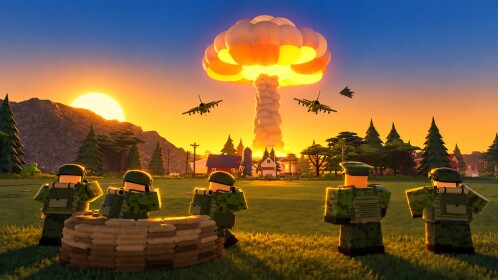
Army Commander Tycoon, sad builderboy's Roblox tycoon about growing a small outpost into a war machine, builds its army out of a handful of force families: infantry, tanks, artillery and helicopters, with vehicles and aircraft named alongside them in the game's feature list — and an "and more" promising further types as your army grows. The developer's description works at family level and doesn't name individual units or publish stats for the standard unlocks, so the useful map is exactly this: which families the game names, how the base loop brings them in, and what the alerts captured in recorded gameplay say about the forces moving on the field.
The force families the game names
The game's own description does the classifying: "Unlock infantry, tanks, artillery, helicopters and more, then send your army out to capture objectives and crush enemy forces." The feature list repeats the heavier families — "Unlock tanks, vehicles and aircraft" — and adds recruiting powerful troop types through your base.
| Force family | Where the game names it |
|---|---|
| Infantry | Game description — "Unlock infantry, tanks, artillery, helicopters and more" |
| Tanks | Description and feature list |
| Artillery | Game description |
| Helicopters | Game description |
| Vehicles | Feature list — "Unlock tanks, vehicles and aircraft" |
| Aircraft | Feature list — "Unlock tanks, vehicles and aircraft" |
The list is open-ended by the developer's own wording — "and more" — so anything beyond these six families simply isn't documented yet. What the game does say about every named family is the same job: your forces are sent out to capture objectives and crush enemy forces. For closer looks at the heavier families, see the pages on tanks, aircraft and vehicles.
How the families arrive: the base loop
Forces come in through the base loop: build and upgrade your military base, recruit powerful troop types, unlock tanks, vehicles and aircraft, and earn more income as your army expands. In the loop the developer describes, base upgrades come first and new troop types and heavier forces follow. The full recruitment walkthrough lives in the beginner guide, and the money side is covered in the income guide.
How to tell forces apart in play
In the recorded gameplay we checked, the game's announcer named force types in its alerts — "Enemy armor sighted", "Enemy aircraft" — and flagged own-vehicle losses with "Vehicle down". Listen for callouts like these:
| Captured alert wording | What it reported |
|---|---|
| "Enemy armor sighted" | Enemy armored ground forces have been sighted |
| "Enemy aircraft" | Enemy air units are in play |
| "Vehicle down" / "We just lost a vehicle" | One of your own vehicles has gone down |
| "Point secured" / "Objective taken" / "Good work, commander" | Your side captured an objective |
| "We've lost a point, commander" / "One of our points is under attack" | An objective was lost or came under attack |
| "Hostiles at the wire. Defend the base." / "Commander, our base is under attack" / "Enemy forces are hitting our position" | Your base or position is under attack |
The distinction between the two enemy alerts is the threat domain: "Enemy armor sighted" reported ground armor, while "Enemy aircraft" reported air units. Treat these as the wordings captured in that one session rather than a complete alert list — other events can use other wording, and the session captured no by-name callouts for infantry, tanks, artillery or helicopters. For what to actually do when a callout fires, see the battle guide and the capture points breakdown.
Named forces and gear in the store
Beyond the standard unlocks, the in-game store carries passes whose names advertise specific combat forces and equipment: Delta Commandos, Battle Mech, Gunship, AC-130 Spectre, Battleship, Hovercraft, Drone Swarm, Flamethrower Squad, Stealth Bomber and Personal Jeep, plus weapon-type names like Flamethrower, Minigun, Rocket Barrage Launcher, .50 Anti-Materiel Rifle, Revolver Grenade Launcher and Jetpack. The store mixes these with army and economy passes (Bigger Army, VIP Commander, Rapid Deployment, 2x Cash, Auto Pump, Extra Loadouts) and cosmetic items (camo packs, Ghillie Suit, Golden Desert Eagle, Officer's Cap & Aviators, Commander Statue, Gold HQ, Flag Emblems) — 33 passes in total at the time the store was checked.
One caution when reading that list: these are the store's labels only. What any individual pass grants in-game isn't spelled out by the name alone, so open the pass description in the store before spending Robux — a force-sounding name is just a name until the store page tells you what it does. If you want current free extras or recent changes first, the game's codes and updates pages keep the live lists.
Quick orientation
If you're just starting out, think in this order: the six named families first (what the game says is on the field), base upgrades second (what the loop brings in next), and in battle the announcer third — the recorded session shows it naming enemy armor and aircraft and flagging lost vehicles. Everything beyond those families is still undocumented, so treat this page as the confirmed map of the game's forces rather than a complete unit list.